


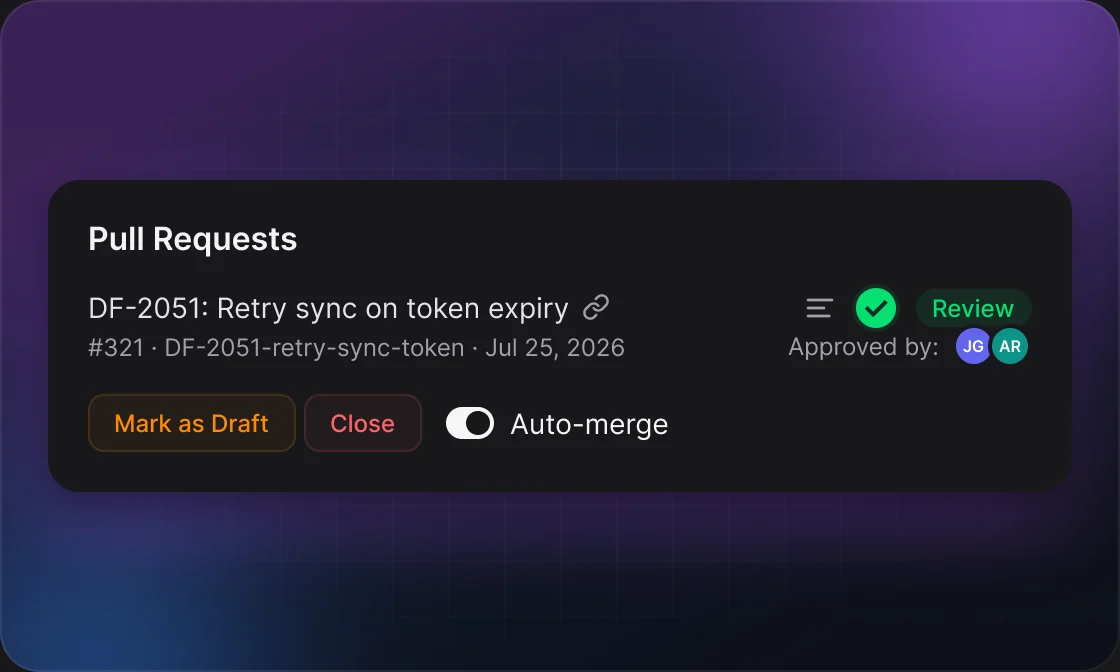
01Turn it on
Auto-merge is set per repository and starts switched off.
1
Open the rules
Settings → Git → pick the repository → API Automations, then switch on PR Auto Merge.
2
Set your rules
Click Edit, choose who has to approve and what else must pass, then Save.
3
Keep the PR switch on
Each of your open PRs shows a merge button. Green means DevFlow will merge it; click to turn it off for that PR.
02Rules
Every rule you turn on has to pass before DevFlow merges.
RULEWHAT IT CHECKSDEFAULT
Approval rulesHow many approvals, and from whom. Add several conditions — all of them must pass.1 from anyone
Green pipelineThe latest pipeline on the newest commit has finished and passed.On
Resolved commentsNo review thread is left unresolved.Off
Merge methodMerge commit, Squash or Rebase.Merge commit
Delete branchRemoves the source branch after the merge.On
Using PR types? Each type — Feature, Bugfix, Hotfix — can have its own rules, or have auto-merge disabled. Types without custom rules use “All”.
03Good to know
Only your own PRs
Auto-merge acts on open pull requests you authored in that repository.
Skipped, not failed
Drafts, PRs with merge conflicts and PRs whose mergeability isn’t known yet are skipped and checked again on the next run.
A running pipeline blocks the merge
With “Green pipeline” on, DevFlow waits until the pipeline finishes — it doesn’t merge on a pending one.
Always the newest commit
Rules are checked against the latest commit, so a push from auto-fix resets the pipeline check.
See why it waited
Every skip is written to the background automation log with its reason, e.g. “PR is a draft”.
04Example
14:05Reviewer approves #412
14:12Pipeline turns green
14:13DevFlow squashes #412 into develop and deletes the branch